

No Category
2025.06.19
Ohanasi Kagawa Event Pre-Participation Checklist
✅ I have reviewed the event flow and important notes If this is your first time joining, you may be unsure how the event works or how you’ll connect with international participants. Please check the event flow in this article before attending. ✅ I understand that a participation confirmation based on balance adjustments is sent 24 hours before the event To ensure one-on-one interactions between Japanese and international participants, we adjust participant numbers 24 hours before the event. This means: We aim for a 1:1 ratio of Japanese and international participants. If, for example, there are 30 Japanese sign-ups and only 25 international sign-ups, the last 5 Japanese participants to register will not be able to join. Spots are confirmed on a first-come, first-served basis. If you’re not selected to join: You can try registering earlier for the next event. You can also enable "last-minute spot notifications" for cancellations. However, a spot is not guaranteed, even if a notification is received. ✅ I understand that if I cannot communicate due to technical issues, I may be asked to leave If you can't hear your partner, they can't hear you, or your camera doesn't work, our staff will assist you.If the issue persists, you may be asked to leave the event. Smartphone participation is possible, but often causes issues.We strongly recommend using a computer or tablet and Google Chrome or Safari browsers.Please note: We cannot provide support for internet or device problems. ✅ I have created a Remo account The event takes place on an online platform called Remo.First-time users must create an account using a Google account or email address.Check how to register here → Remo Registration Guide ✅ My display name in the event matches my Ohanasi Kagawa registration name Many users find that the name shown in the event differs from their Ohanasi Kagawa profile name.This often happens when registering for Remo with a Google account, which uses your Google name by default. If the names don’t match, it can cause issues during attendance check or seat matching. To fix this: Click your icon in the top right corner of the Remo screen. Click the “Edit” button to update your name. Our staff may also contact you to request a name change. Please check this artical below. https://ohanasikagawa.com/blog/operation_manual/ ✅ I know how to check my seat assignment Your seat will be announced during: The opening presentation The 5-minute break Until then, you are free to move around. To check your seat: Click the chat icon next to the camera and mic icons. Select General Chat to see your assigned seat. If you're still unsure, please visit the staff room in the center of the event space. Please check this artical below. https://ohanasikagawa.com/blog/operation_manual/ ✅ I know what to do if I’m paired with someone making me uncomfortable If you’re paired with someone whose behavior is inappropriate or uncomfortable, please follow these guidelines: Emergency (you feel unsafe): Close your laptop immediately. Ensure your safety and then contact staff. Uncomfortable but not dangerous: Message the staff in the chat or visit the central staff room for support. Slight discomfort or difficulty communicating: Message staff via chat. A support member will join your table to help. For more detailed instructions, click here.

Ohanasi Kagawa

No Category
2025.05.17
What to Do If You Experience Issues or Meet a Disrespectful Partner During the Event
At Ohanasi Kagawa, we are committed to creating a safe and welcoming environment for everyone. However, as with any online event, technical issues may occur, or you may be matched with someone whose behavior makes you uncomfortable. This guide outlines what to do if you experience trouble during the event or are paired with someone who is disrespectful or unpleasant. ① If You Experience Technical Issues During the Event While rare, technical problems may occur—especially with unstable internet connections. Common issues include: ●Poor audio quality ●Frozen or lagging video ●Inability to see or hear your partner If you encounter any of these issues, try the following: 1 - Restart your computer and rejoin the event 2 - Use Google Chrome or Safari for the best performance We recommend joining from a computer or iPad, as connecting from a smartphone can increase the chance of technical issues. If you continue to have trouble, our staff will try to assist you. However, if the issue cannot be resolved, you may need to leave the event. We ask for your understanding in such cases. Please don’t feel guilty if you experience technical difficulties—it’s often out of your control. But to reduce the risk, we strongly recommend using a stable device and a supported browser (Chrome or Safari). ② If You're Paired with Someone Who Makes You Uncomfortable At Ohanasi Kagawa, participants are randomly matched for one-on-one conversations (or small groups if the numbers call for it). While most interactions are pleasant, you may occasionally be matched with someone who is aggressive, disrespectful, or simply not a good fit. If this happens, here’s how to handle it: 1 – Close Your Device Immediately (If It’s a Serious Situation) If someone behaves in a way that makes you feel unsafe or deeply uncomfortable, shut your computer immediately. Your safety and well-being come first. After you’ve exited, please report the incident via chat or our official LINE account so that staff can respond appropriately. These situations are rare, but it’s important to know that you can always leave immediately. 2 – Visit the Staff Room for Help If your partner isn’t behaving aggressively but you’re feeling uncomfortable or don’t get along, you can go to the Staff Room located at the center of the event space. Staff members are always available there. Please explain your situation to them. They may issue a warning to the other participant or rematch you with someone else, depending on the situation. You’re welcome to leave your conversation and visit the Staff Room at any time. 3 – Contact the Event Manager or Staff via Chat If you’re feeling uncomfortable but don’t feel you can leave the session directly, use the private chat function to contact either the Event Manager or a Staff member. Here’s how: 1- Open the chat window 2- Select “Private Chat” 3- Choose someone with “Event Manager” or “Staff” next to their name 4- Send a message like: “I need help,” or “My partner is being aggressive, I’m feeling uncomfortable.” A staff member will come to assist you as soon as possible. Feel free to message either the Event Manager or any Staff member, but please try the Event Manager first.If you don’t receive a response, message a Staff member instead. In emergencies, contacting either is fine. You can also report the incident after the event via chat. Summary We hope this guide helps you feel more confident and secure during your time at the event. While we strive to prevent issues, there is always a small chance that technical difficulties or uncomfortable encounters may occur. Knowing what to do in those situations can help you stay safe and feel empowered. Our entire Ohanasi Kagawa team is here to support you, and we’ll do everything we can to ensure a positive and enjoyable experience. If you have any questions or concerns, please don’t hesitate to reach out to a nearby staff member or contact us via chat. We look forward to seeing you at the event!
Ohanasi Kagawa

No Category
2025.05.17
How to Find Your Assigned Seat at the Ohanasi Kagawa Event
At Ohanasi Kagawa events, our staff carefully match participants for one-on-one talk sessions. Once your seat number is announced, please move to your designated seat and begin your conversation with your matched partner. This guide explains how to check your seat number and what to do if you have trouble locating or moving to your seat. ① When Your Seat Number Will Be Announced At Ohanasi Kagawa events, seat numbers are usually announced twice: First Announcement: After the opening presentation Second Announcement: After the first talk session and a 5-minute break (before the second session begins) For your reference, the opening presentation starts at 9:00 AM JST on Sundays and 7:00 PM JST on Saturdays. Seat assignments will not be announced before the opening presentation. Until then, please feel free to mingle and enjoy casual conversations with other participants. ② How to Check Your Seat Number There are two ways to check your seat number during the event: 1 – During the Presentation via the Chat Screen While the presentation is ongoing, seat assignments will be posted in the public (main) chat.Look for your name in the list and check which seat number you've been assigned. 2 – After the Presentation via the Chat Button Once the presentation ends, click the chat button.From there, open the General chat to review the list of seat numbers that were announced during the presentation.Find your name and note your assigned seat. Once you've confirmed your seat, please move there promptly. ③ How to Move to Your Assigned Seat After confirming your seat number, you’ll need to double-click on your assigned seat to move there. Can’t See Your Seat? If your seat is located toward the bottom of the screen, it may be hidden from view.In this case, click and drag the screen to scroll and locate your seat. Can’t Enter the Seat? If someone hasn’t moved yet or someone else is accidentally sitting in your seat, you may not be able to enter it.If this happens, you can: Wait a moment until the seat becomes available Go to the Staff Room located at the center of the event space and ask for help ④ What to Do If You Still Can't Find or Move to Your Seat If you’re still having trouble finding or moving to your seat, please don’t hesitate to: Visit the Staff Room in the center of the event space Message a staff member in the chat (look for the name marked with “Staff”) Our team will be happy to guide you to your seat.If you're new to the platform or unsure what to do, that's completely okay—please don’t feel embarrassed to ask for assistance! Summary We hope this guide helps you smoothly find your seat and get started with your talk session.Being able to move to your seat easily helps your partner feel more at ease and allows our team to keep everything running smoothly. If you have any questions or need further assistance, feel free to speak with a nearby staff member or contact us via chat. We’re here to support you and ensure that your experience at Ohanasi Kagawa is enjoyable and meaningful!
Ohanasi Kagawa

No Category
2025.05.16
Ohanasi Kagawa Event Venue Operation Manual
Ohanasi Kagawa events use the Remo platform. If this is your first time using Remo or you are not familiar with it, please refer to this manual for guidance. Registering for a Free Remo Account to Enter the Event Venue How to Move Around in the Event Venue How to Set Your Camera Mode in the Event Venue How to Use the Chat Feature in the Event Venue How to Change Your Name in the Event Venue 1. Registering for a Free Remo Account to Enter the Event Venue To enter the event on the Remo platform, click the "Enter Event" button on the Ohanasi Kagawa member page. This will bring you to the Remo venue. To join the event, you will need to create a participant account. You can register using your Google account, Facebook account, or email address. If you have a Google or Facebook account, it’s recommended to use one of those for a smoother registration process. If you choose to register with your email address, you will receive an email from Remo with instructions. Once you receive the email, click the “Sign In” button to complete the registration and gain access to the event venue. For more detailed instructions, please refer to this article: How to Register/Participate in a Remo Event >>> 2. How to Move Around in the Event Venue Here’s how to navigate within the Ohanasi Kagawa event on Remo: To move to a different table, simply hover your cursor over the table you want to join and double-click on it. Note: The process may vary slightly if you are using a mobile phone or iPad. Please refer to the following articles for more information: How to Use Remo on a Mobile Device >>> 3. How to Set Your Camera Mode in the Event Venue Sometimes, your camera may appear too large or too small in the event venue. If that happens, you can adjust it by using the camera display toggle. You can choose from three views: Floor View: This shows your camera and the other participants’ cameras in smaller boxes, with the entire event space visible. This is recommended when you are moving between tables. Tile View: This makes your camera and the other participants’ cameras larger, making it easier to see faces. This is ideal for sessions or one-on-one conversations. Speaker View: This enlarges the camera of the active speaker, making it more focused. This is recommended during presentations or talks. 4. How to Use the Chat Feature in the Event Venue If you need to check your seat number, view announcements, or chat with other participants, you can use the chat feature. Click the chat button next to the microphone and camera icons to open the chat window. There are three types of chats available: General Chat: Use this to check your seat number or view general announcements. Table Chat: Use this to chat with people sitting at the same table as you. Feel free to use this during sessions. Private Chat: Use this to message a specific person directly. This is useful if you don’t want to leave a public message in the session or table chat. Please note that once you leave the event venue, you won’t be able to see the chat history, so make sure to save any important messages for later if needed. 5. How to Change Your Name in the Event Venue When you enter the event venue, the name displayed will be the one registered with your Google, Facebook, or other account. This name may be different from the name you registered on the Ohanasi Kagawa member page. For example: Ohanasi Kagawa member page name: Aki Google account name: Ota If the names are different, it may cause issues with seat matching, so please update your name in the event venue to match the one on the Ohanasi Kagawa member page. Please use your name in Roman characters for consistency! Here’s how to change your name: Click your profile icon in the top-right corner. Click the Edit button. Click the edit button next to your photo. You can now edit your name and profile picture. Once finished, click the Save button to confirm the changes. Summary That’s the basic guide to navigating and using Remo at Ohanasi Kagawa events. These steps cover most of the operations you’ll need for the event. If you have any questions or need assistance, feel free to ask a nearby staff member or contact us via chat. Our staff is here to help ensure you have a wonderful experience at Ohanasi Kagawa! For any questions or feedback, please reach out to us via Chat.
Ohanasi Kagawa

No Category
2025.05.16
Ohanasi Kagawa’s Event Rule
At Ohanasi Kagawa, we have established a few rules to ensure that all participants can enjoy safe and comfortable interactions. Please be aware that failure to follow these rules may result in immediate removal from the event, or in future participation being prohibited. Rule 1: Respect and Consideration for People of All Nationalities Only those who hold respect and empathy for people from other countries are welcome to join Ohanasi Kagawa events. Our events are designed to create an environment where both Japanese people and those from other countries can interact comfortably. Therefore, we do not accept participants who show disrespect, criticism, or contempt towards other nationalities, cultures, or customs. We encourage participants who are open to understanding different perspectives and ways of life to join. Rule 2: Avoid Disrespectful Behavior and Attitudes We aim to create an environment where everyone can have pleasant and respectful interactions. We do not tolerate behavior or language that may make others uncomfortable. This includes rude speech, inappropriate tone, or offensive attitudes. If we receive reports of such behavior, we will issue a warning. If no improvement is seen, we will take action, including removal from the event and a ban on future participation. Rule 3: No Dating, Religious, or Multi-Level Marketing Solicitations Solicitations for dating, religion, or multi-level marketing are strictly prohibited at Ohanasi Kagawa events. If such behavior is detected, the individual will be immediately removed from the event and banned from future participation. Rule 4: Respect Event Structure and Time Limits Each Ohanasi Kagawa event has a structured schedule and specific time limits for discussions. For example, if it’s a time for speaking in English, participants should adhere to that and not continue speaking in Japanese just because they prefer it. Disregarding the event structure and focusing only on one’s own desires is not acceptable, and such participants will be warned. Rule 5: Notify Staff If You Need to Leave Early Ohanasi Kagawa events are typically organized with a balanced number of participants for one-on-one interactions. If you need to leave the event early, please inform a staff member, as we may need to adjust the balance of participants. In general, we ask that you plan to stay for the full duration of the event when making your reservation. Summary If you have any questions or are unsure about anything, feel free to ask a nearby staff member or contact us via chat. Our staff will do their best to support you in having a wonderful experience at Ohanasi Kagawa. For any inquiries or feedback, please reach out to us through chat.
Ohanasi Kagawa

No Category
2025.03.08
How to register an account for Ohanasi Kagawa
About Ohanasi Kagawa Account Registration Why do you need to register for an account? Ohanasi Kagawa events are held using a dedicated web app. You need to do everything from booking an event to entering the event venue in the web app. Please be assured that your information will not be used outside of the event. Account registration is free. Click here to register an account >>> Account Registration Details To register for an Ohanasi Kagawa account, please fill out the following form. Create IDThe Create ID field allows you to set an ID (a series of alphanumeric characters) that you would like to use. You can only use letters, numbers, “-” and “_”. There is no need to memorize it, so please set your favorite ID. It will be used to check the participation status of the event and for the operator to manage the information. Example ) aki1220 / english1001 / gogotakuro NameWe would like you to write your name. If you do not want to write your full name, you may write only your first name. Kanji and katakana are also acceptable, but we recommend that you write your name in alphabetical characters so that it is easier to read for people overseas. Nicknames are not acceptable. EmailPlease set up an email to receive communication from Ohanasi Kagawa. We recommend that you use an email address that you use frequently, as there are many emails that you may not receive when you participate in an event. Also, please make sure that your email address does not go into your spam or promotional email folders. If your email goes into the spam or promotion folders, please set up your own settings so that the email will be delivered to your main folder. New PasswordPlease set a password that you can easily remember. You will need it to log in to the Ohanasi Kagawa web application. If you forget your password, you can reset it. The password must contain both alphabetic and numeric characters, and must be between 8 and 20 characters long. New Password ConfirmationPlease re-enter the password you just set. We ask you to enter the same password twice to prevent mistakes. Japanese Learner or English LearnerPlease choose the language you are learning. If you are learning Japanese, please check “Japanese Learner” and if you are learning English, please check “English Learner”. I agree to the Terms of UseIf you agree to the Terms of Use, please check the box next to “I agree to the Terms of Use. You will not be able to register unless you agree to the Terms of Use. Notification registration (optional)Ohanasi Kagawa will send you periodic email notifications about upcoming events and other information that may be of interest to you and your language. You can unsubscribe at any time if you no longer wish to receive these emails. If you do not wish to receive email notifications, please remove the check mark. RegisterOnce you have completed all the fields, please click on the Register button. Confirmation of verification emailAfter you click the “Register” button, a verification email will be sent to your registered email address. Please open the email and verify the email from Ohanasi Kagawa. If you are able to authenticate, you will be able to log in to Ohanasi Kagawa's web application using the email address and password you have set up. Click here to register an account >>>
Ohanasi Kagawa

No Category
2024.10.22
How to Use Language Partner Service
What is Language Partner Service? The Language Partner Service is a service that enables Japanese and English language learners to safely find language exchange partners who are a good fit for them. Many language exchange services and apps have raised concerns about safety.Many of these services and apps have a mix of users with different goals than improving their language skills, such as malicious solicitation and dating, making it difficult to find a language partner who can help you improve your language skills. In addition, the steps required to actually engage in conversation were complicated, and chatting was not always easy.The Language Partner Service eliminates these safety and convenience issues and helps you find and establish a relationship with a language partner more safely and quickly. https://youtu.be/IoYGPn9b_j8 This service has a screening system This language partner service has introduced a screening system to ensure a higher level of security. Those who can register for this language partner service are as follows Those whose safety has been approved through a screening process based on face-to-face consultation. Students of Ohanasi Japanese Language School Students of Ohanasi English Personal Gym Ohanasi Kagawa / Ohanasi Japanese Language School staff and teachers We limit the number of people who can register for our service through a screening system to ensure that only high quality users can use our service. We will also keep track of user evaluations, reports, and the number of late arrivals and no-shows, and will forcibly terminate users who are not suitable for our service. We will make this service as safe as possible for all users. From registration to establishment of a language partner The following is the process from registration with the Language Partner Service to the establishment of an actual language partner. There are six major steps. Step 1 : Book a Consultation Appointment If you are interested in this language partner service and would like to use it, please make an appointment for free consultation before joining. Appointments can be made through our website here. Consultation Appointment >>> Step 2 : Free Consultation At the free consultation, we will ask you about your current Japanese study status, the purpose for which you wish to use this service, and tell you how to use this service. After the consultation, we will conduct a screening and inform you of the results within 1 to 3 business days by e-mail. Only those who pass the screening will be able to start using the service. Please understand that we cannot tell you the details of the screening process. Step 3 : Membership and Subscription Registration Once you have joined, you will be asked to register your subscription. If you have a coupon code, you will be asked to enter the coupon code at the time of subscription registration. We will provide detailed instructions on how to register your subscription on the lower part of this page. Step 4 : My Page Registration and Partner Search Once you have successfully registered your subscription, you will first need to edit your My Page. The following are the details to be edited on your My Page. Profile Settings - Set up your nationality, current location, profile photo, language studied, language level, hobbies, self-introduction, etc. Calendar settings - Set up a calendar of available times when you would like to talk with your language partner. You will receive meeting requests from language partners at these available times. Once you have registered on My Page, you can search for potential language partners. Check the profile and availability schedule of the language partner you are interested in, and if you would like to talk with that language partner, click the Request button to send your request. Step 5 : First Contact (Trial Meeting) First contact is a one-time trial meeting. This is a trial meeting to actually talk with the potential language partner you have sent your request to, and to check if you and the potential language partner are compatible. The duration of the meeting is 30 minutes, alternating between 15 minutes in Japanese and 15 minutes in English. No exchange of contact information is allowed within the first contact. After the 30-minute conversation, please leave the meeting room immediately. Step 6 : Language Partner Decision At the end of the first contact, a pop-up will appear in the Ohanasi Kagawa web application and you will be asked if you would like to continue your relationship as a formal language partner with the potential language partner you talked with during the first contact. If both parties who made first contact press the button indicating that they wish to continue to build a formal relationship as language partners, they will be officially recognized as language partners. Once a language partner is established, you can send each other meeting time requests from your calendars at any time, and you can enjoy conversations at any time. Currently, there is no limit to the number of language partners. Pricing Monthly Subscription Pricing is on a monthly subscription basis. Regular users will be charged 5,000 JPY per month. In addition, students of our partner schools, Ohanasi Japanese Language School and Ohanasi English Personal Gym, will be able to use this service for free. As of October 2024, there is no limit to the number of first contact requests sent, the number of language partners, and the number of meetings. Any future changes to the plan will be announced separately. Subscription Renewal and Cancellation Subscriptions are automatically debited by a payment system called Stripe.If your billing cycle starts on September 2, you will always be billed on the 2nd of each month.If the starting date of the billing cycle is January 31, the billing date will be the last day of the month closest to the starting date.Thus, the billing dates would be February 28, March 31, April 30, and so on.Please check My Page → Other → Payment Information for the next billing date.You may cancel your subscription at any time.Once you cancel your subscription, the fee will not be automatically deducted from your next billing date.You will still be able to use the service until your next billing date.To cancel your subscription, go to My Page → Other → Payment Information → Payment Information and click on the “Cancel” button on the Payment Information page.Please note that when you cancel your subscription, all information about your language partners will be deleted.If you have any further questions regarding fees, please contact us anytime at one.ii.seventy@gmail.com. How to Register for Subscription We will now tell you how to register for a subscription and how to use the Language Partner Service. In order to use the Language Partner Service, you are required to register for a subscription. If you have a coupon, please be sure to enter the coupon code when you register for subscription. Step 1 : Log in to the Ohanasi Kagawa web app To use the language partner service, you need to log in to the Ohanasi Kagawa web application first. Please login to Ohanasi Kagawa web app from here. Login to Ohanasi Kagawa Web App >>> If you have not yet registered for Ohanasi Kagawa Web App, please register first. Register for new Ohanasi Kagawa web app >>> Step 2 : Click on the Language Partners tab to go to the subscription page Once you have registered for an account on the Ohanasi Kagawa web application and are logged in, click on the “Language Partners” tab on the left side under the Home, Events list. Clicking on it will take you to a page like this one. Step 3 : Click on the “ Subscribe” button to set up your payment method. Scroll down to the lower part of the page after clicking on the Language Partners tab and you will see the “ Subscribe” button. If you click the “ Subscribe” button here, you will be taken to the payment method setup screen. When you enter the Add Payment Method screen, please enter the credit card information you would like to use. Even if you are a student of one of our partner schools, which are available free of charge, you will need to add your payment method here. For credit card payment, we use Stripe, so please check with Stripe by yourself. Step 4 : Agree to the Terms of Use and add a coupon code When you add a payment method, you will be asked to agree to Ohanasi Kagawa VIP Terms of Use and Stripe Payment Terms of Use. If you agree to the Terms of Use, please check the box to confirm your agreement. If you have a coupon code, please enter it here. Once you have agreed to the Terms of Use and entered your coupon code (if you have one), click the “ Subscribe” button to start your subscription. You will be able to use the service as soon as your subscription starts. Edit My Page Profile Settings Once your subscription has started, you should first edit your My Page. You can jump to My Page by clicking on your icon mark in the upper right corner. Once on My Page, click on the Edit Profile button (pen icon) to edit your profile. Edit Profile List Name Full name or just the first name is okay, but we recommend writing it in alphabetical characters so that people from different countries can understand it. Birthday Select your birthday from the calendar. Please note that once a birthday is set, it cannot be changed. You can change the month and year by clicking on the cursor button ◁▷like this one to change to the calendar. Gender Please select from Male, Female, Other, or Unanswered. Profile Photo Please upload a photo that shows your face as clearly as possible. A profile photo can make a big difference in your chances of being matched with a language partner, so please make sure to upload a profile photo. Nationality and Country of Residence Please select your country of residence and nationality. Your Learning Languages Please select “Japanese” if you are learning Japanese or “English” if you are learning English. Japanese level, English level Please select the level of Japanese and English you think you are at. ★5 means you are at a high level and ★1 means you are at a low level. What speed level are you expecting from your partner? This is the desired speed at which you would like your language partner to speak the language you are learning. A score of ★5 means that you are comfortable having your partner speak at native-level speed, and a score of ★1 means that you would like your partner to speak very slowly. Hobbies Please select at least 3 of your hobbies. You can select more hobbies by clicking the More button. Self-Introduction, Self-Introduction Video Please fill in your self-introduction in English or Japanese. If you are a Japanese learner, try writing your self-introduction in Japanese too. It is okay if it is simple, so try to write your self-introduction in Japanese, even if only a little. You can also display a self-introduction video if you want people to know more about you. If you upload your video to Youtube and paste the link to your self-introduction video, your self-introduction video will be displayed on your profile. Setting up your schedule Once you have finished setting up your profile, it is time to set up your schedule. Click the Schedule button next to your profile. Press the Schedule button to display the calendar.With this calendar, you can set the times when you are not available for meetings in 30-minute increments. Please block the times when you are sleeping, working, doing household tasks, or otherwise unable to have a meeting with your language partner. Click on the time slots in the calendar to mark the periods when you are not available for meetings with your language partner. When you click on the cell you want to close and press the “Setting” button, the cell will turn gray, and your language partner will not be able to book that time.(This applies only when you are in First Contact or an Established Language Partner status.) Instead of clicking each cell one by one, you can also drag across multiple cells to quickly set your unavailable times. Pattern Settings When you click on a cell in the calendar, you will see an option that says “Set as recurring unavailable time for the same day and time each week.” By checking this box, you can close the same time slot on the same day every week. For example, if you usually sleep on Mondays from 12:00 a.m. to 8:00 a.m. and want to keep that time unavailable for meetings, simply drag to select that time period. Then, check the box that says “Set as recurring unavailable time for the same day and time each week.” After pressing the “Setting” button, you will see that the same time slot on the same day every week has been set as unavailable (closed). For any recurring unavailable times you have set, there will be an ✖ button displayed on the gray cells. You can click this button to delete the recurring pattern whenever you need to. Search for Potential Language Partners List of Potential Language Partners Once you have completed setting up your profile and schedule, it is time to search for potential language partners who are a good fit for you. Click on the Language Partners tab in the menu on the left.Clicking on it will bring up a list of potential language partners. In the list of potential language partners, click on the frame of the person you are interested in to see the detailed profile of that potential language partner.You can also change the order of the list by login or account creation date using the sort button in the upper right corner.You can register a favorite by clicking on the label icon.Last access shows when the person logged into this language partner service. Language Partner Details Page Click on the frame of the potential language partner you are interested in on the Language Partner List page to view detailed profiles. On the Language Partner Details page, you can check the name, nationality, last login time, number of late meetings, profile, and availability schedule of a potential language partner, and send a first contact request.First, check the profile and availability schedule of the potential language partner you are interested in, and then decide whether you would like to become a language partner with that person in the future. Then, if you are interested in continuing the interaction as a language partner in the future, you can request a first contact with the person by clicking the “Send Request” button in the upper right corner. Once the request is sent, the partner has the option of accepting or rejecting the request.If the partner accepts the request, a first contact (first trial meeting) is established and the language partner will be listed in the First Contact tab on the Language Partner List page.You will be able to have a one-time 30-minute trial meeting with the language partner with whom you have made First Contact. First Contact (First Trial Meeting) What is First Contact? First Contact is an initial trial meeting. You can have a one-time 30-minute trial meeting with someone with whom you would like to build a relationship as a language partner in the future. During the 30 minutes, you will alternate between speaking Japanese and English for 15 minutes. The purpose of this first contact is to see if the potential language partner is a good match for you. During the 30-minute meeting, you will ask yourself if this person is a good match for you. Will he/she be able to help you learn the language as a language partner? Are you and your partner at the right language level? The meeting is held to check if the language level is appropriate for you and the other party. For this reason, we do not allow the exchange of contact information during the first contact. At the end of the 30-minute meeting, thank your partner for his/her time and leave the meeting room. After leaving the meeting room, you will be asked if you would like to continue to communicate with the potential language partner you talked with in the web application. Selecting a Date and Time for First Contact If you see the person you have requested in the First Contact tab on the Language Partner List page, your first contact is in progress. Press the Schedule button on your partner’s profile page to check their available time slots. The gray cells indicate times when they are not available.Please click on the white cells (times when they are available and you are also available) to send a meeting request. You can select up to three preferred meeting time slots. After clicking on the time slot you want, press the “Add preferred time” button if you would like to add more options. Once you have selected up to three time slots, press the “Send request” button to submit your meeting request. When you request a meeting time and the partner accepts your meeting request, information about the meeting partner, the meeting time, and an “ Join” button will be displayed on the home screen.When you click on the green color of the meeting partner's name, you will be redirected to a page where you can view the partner's detailed profile.On the day of the meeting, click the “ Join” button to enter the Ohanasi Cafe virtual space and have a 30-minute first contact with the other party. How do I cancel a meeting request? There may be times when you want to cancel a meeting request after you have sent it to the partner during the first contact or during an established language partnership, or after a meeting has been scheduled. In this case, go to "My Page" → "Schedule" to check your calendar. You will see that your calendar cells are colored orange if you are waiting for a meeting request response, blue if the meeting is confirmed, and so on. If you want to cancel a meeting appointment, click on the colored cell in your calendar. Then the Cancel button will appear, and you can cancel the meeting request by clicking Cancel. Many people try to cancel a meeting appointment by clicking on the colored cell in the language partner's calendar. Please be sure to check your own calendar from My Page and press the cell of your calendar to cancel your meeting appointment. Conducting first contact Setting up the camera and microphone On the day of first contact, enter the Ohanasi Cafe virtual space using the "Join" button displayed in the Ohanasi Kagawa web application. Once in the virtual space, turn on your microphone and camera. Click on the microphone and camera icons at the bottom of the screen. There is also a chat icon in the lower right corner, which you can use to chat with other people. What if the camera and microphone do not work? If the camera and microphone do not work, please first check your browser settings and make sure that you are allowed to use the microphone and camera. Click on the settings icon ( 〇ー/ー〇) where the URL above app.gather is written. If the camera and microphone are not allowed, turn them on and allow the camera and microphone. If you don't understand, please read this page with translation. About browser settings >>> Starting a conversation with your language partner When your language partner arrives at the virtual room, you will greet them and start a conversation. You will take turns talking in Japanese and English for 15 minutes, but please discuss with your partner whether you will speak first in Japanese or English. When you sit down, a timer for 15 minutes will be displayed, so either of you can press the timer from the screen below or press the X button to start the timer. Once the timer starts, you can start the conversation in either Japanese or English. After 15 minutes have passed, switch the language of conversation from Japanese to English or English to Japanese. If the partner does not show up On the day of the meeting, you may be waiting for your partner to arrive at the virtual space, but he/she may not show up. If your partner does not show up after 10 minutes, please leave the space. After leaving the space, you will see a popup on Ohanasi Kagawa's web application where you can write down your evaluation of today's meeting partner and whether you would like to build a relationship as a language partner in the future. Please check the box if your meeting partner was late or absent for more than 10 minutes. If you are late or cancel more than 3 times, you will not be able to use this service. End of conversation with language partner and exit the virtual room When you have talked with your language partner for 15 minutes in Japanese and 15 minutes in English, you will thank your partner and leave the virtual room. Please note that it is not allowed to exchange contact information with each other during first contact. You can leave this room by closing the tab of the open page by pressing X. After you leave the room, you will be asked to enter your evaluation of the other person and whether you would like to continue to communicate with him/her as a language partner on Ohanasi Kagawa's web application. Language Partner Establishment Selection Evaluation of first contact partner After the first contact is completed, a pop-up will appear on the Ohanasi Kagawa web application asking you to rate the first contact, to confirm that the person was not late or cancelled more than 10 minutes prior to the first contact, and to indicate whether you would like to continue to communicate with that person as a language partner. Please complete the form when the pop-up appears. If you click “Partner Consent” and the other partner also clicks “Partner Consent,” then you have officially established a language partnership. Unless either one of you clicks “Partner Rejection” or the other partner does not evaluate you as a language partner, you will not be able to establish a language partnership. Language Partner Established When both partners have made initial contact and clicked the "Partner Consent” button, a language partner is officially established, and the established language partner will appear in the Language Partners tab of the Language Partners List. You can schedule as many meetings with your language partner as you like on each other's calendars until one of you terminates the partnership or cancels the subscription. We hope you will try to build a better relationship with your language partner! How to Cancel Your Subscription To cancel your subscription, first click the “Others” button on your My Page.Then select Payment Information from the list.On the Payment Information page, click the Procedure button located in the “Unsubscribed” section to complete the cancellation process. Even after cancelling your subscription, you will still be able to use the service until the next billing date.
Ohanasi Kagawa
![Protected: [Limited Sharing] I’ll tell you Ohanasi Kagawa’s secrets stealthily.](https://ohanasikagawa.com/wp-content/uploads/2024/05/23065680_m-1-1024x683.jpg)
Ohanasi News
No Category
2024.05.18
Protected: [Limited Sharing] I’ll tell you Ohanasi Kagawa’s secrets stealthily.
I would like to tell you Ohanasi Kagawa's secrets only to those who have answered the questionnaire. Thank you very much for taking the time to answer Ohanasi Kagawa's limited-time survey. We will continue to improve Ohanasi Kagawa based on your feedback. And as a benefit to those of you who have filled out the questionnaire, I would like to quietly share with you some of Ohanasi Kagawa's secrets. Aki, the founder of Ohanasi Kagawa, writes this blog, and sometimes when I attend events as a participant, people ask me, "How did you create Ohanasi Kagawa? Why did you decide to start Ohanasi Kagawa? I am often asked many questions about Ohanasi Kagawa. So this time, I would like to share the story behind Ohanasi Kagawa, from the creation of Ohanasi Kagawa to what you might think, "Oh, really? I hope you will enjoy this article to the very end. Please do not tell this story to anyone else. Q1: How did Ohanasi Kagawa come to be? First of all, I would like to answer the most frequently asked question, "How did Ohanasi Kagawa come to be? Ohanasi Kagawa is now held online, but it was originally held locally. It started in September 2018 in Kagawa, Japan, where I, Aki, am from. To begin with, what made me decide to create it, I myself quit my job at the age of 23 at the time and was studying English while saving money to enroll in college in the United States. I won't go into details, but while I was learning English, I wanted to speak more English with people from other countries. So I looked for a place in my hometown, Kagawa Prefecture, where I could speak English with people from overseas. However, no matter how much I looked on the Internet, went to international exchange centers, or walked around town, I couldn't find a place where I could speak English with people from overseas. In cities like Tokyo, Osaka, and Fukuoka, there are many opportunities to interact with people from overseas, but in a rural area like Kagawa Prefecture, it is difficult to find a place where you can get to know people from overseas and speak English with them. I was at a loss as to what to do. I gave up on the idea that unless I studied abroad, I would never be able to have an environment where I could use English. I was already feeling frustrated about that. One day, I came to know that an acquaintance of mine was frustrated because, like me, she wanted to speak English with people from other countries but had no such opportunities. There are others who are struggling with the same problem as I am. No matter how hard I look for it, I cannot find the environment I want. If it doesn't exist, let's create it!" With this decision, I launched Ohanasi Kagawa, which brings together people from overseas living in Kagawa Prefecture and enables them to interact with Japanese people in the form of a language exchange. Q2: How did Ohanasi Kagawa spread online? Actually, Ohanasi Kagawa will be held for the 173rd time on May 18, 2024. Ohanasi Kagawa events have been attended by over 3,000 participants from more than 50 countries, but aren't you wondering how Ohanasi Kagawa has spread so widely online? Actually, Ohanasi Kagawa, which was launched in Kagawa Prefecture, was closed once in 2019 because I was enrolling in a college in the United States. However, it was during my study abroad in the U.S. that the COVID-19 pandemic occurred. I, Aki, was living in an apartment in the US at the time, and suddenly all my classes went online because of the COVID-19, and international students were almost kicked out of the US, which was quite hard to deal with. I was forced to stay at home and do my assignments. Aki was into meditation at the time, and while meditating, an idea came to me! The idea! I thought, "Why don't I hold the Ohanasi Kagawa event online? So I held Ohanasi Kagawa online for the first time with only 5 participants, including myself haha. Still, it was new and fun, so I posted the event on the event board to try to get more people to attend. The next day, I was surprised to see that more than 30 people had signed up to participate! I thought, "Maybe there is a huge demand for this? I asked my housemate who was living in the same apartment at the time about it, and the online Ohanasi Kagawa event began to expand. If it weren't for COVID-19, I would have never thought of holding an online event, but I was able to have hope that because it was online, we could connect Japanese people with people around the world who were learning Japanese. Q3 : Ohanasi Kagawa holds its events for free, but how does it cover its running costs? Ohanasi Kagawa has always organized its events for free. We will probably continue to hold events for free in the future. (Of course, we may charge for some optional things, though…) It might sound like fine-sounding talk, but the reason is that I hope to create a society where young people who want to learn English and people like myself in the past who wanted to interact with people from other countries but didn't have the money can interact with people from other countries easily and safely. Of course, Life is not easy. Ohanasi Kagawa's expenses include personnel costs, Remo platform, website, advertising, and so on. At first, we had to make do with our own pocket money, and support from participants, and sponsors, but there was a limit to what we could do, and many times we were driven to the point where we could not continue Ohanasi Kagawa events due to lack of money. It was also getting hard to spend days just asking for support money from the participants. With a desire to get out of that situation, we decided to start a crowdfunding campaign, reached our goal of 2 million yen, and used the funds to start our own business. Now we run an online Japanese language school and an English language school, and we are able to run Ohanasi Kagawa with the profits generated from these schools. I am keenly aware that money is necessary to do what I want to do, and we are working hard to create a good service. Q4 : The idea of Ohanasi Kagawa was actually born from ・・・ Ohanasi Kagawa events are mainly one-on-one, with people taking turns speaking in Japanese and English to exchange languages, right? The service was actually modeled after a particular service. I haven't said much about it, so this is a bit of a backstory, but the concept of "Machicon" Local matchmaking meetup was used as a model. For those of you who have never been to a "Machicon", let me briefly explain. Men and women who are looking for love and marriage gather at a single venue or restaurant, and with their profile cards, they have a short one-on-one conversation. Then, when they have talked with everyone, they have free time to talk with the person they are looking for. Yes, you may realize. This is just like Ohanasi Kagawa, isn't it? When I was in my early twenties, I was into "Machicon", and I loved it. I have tried not to say too much about it because people are often surprised or laugh when I say this, but I believe that new ideas are born when existing things are combined with existing things like this. Unfortunately, Aki was once scolded by his girlfriend when she found out that he went to a "Machicon" haha. Did you feel a little bit closer to me? (^-^;) Q5: Why "Ohanasi" in Ohanasi Kagawa is " si" and not "Ohanashi"? I get asked this question a lot. Why Ohanasi and not Ohanashi? Is it just a mistake or is it a design choice? Of course, I know the alphabet, and I know that "shi" is correct. But when I first started thinking about whether to use Ohanasi or Ohanashi, I thought to myself, "Isn't shi kind of bad looking? I also thought that the Apple logo of Steve Jobs, whom I admire and respect, is not a perfect apple, but has a hole in it, right? It seems that people have a habit of looking at imperfect things rather than perfect things. I'll leave it up to you to decide whether this is by design or by accident, but I really feel satisfied with myself that I'm actually getting people's questions, and that I'm getting their attention haha. I want Ohanasi Kagawa to be a place where anyone can feel free to make mistakes. Don't you think that the name of Ohanasi Kagawa is a good representation of that desire? Q6: What can you see in the Ohanasi Kagawa logo? You must be a big fan of Ohanasi Kagawa if you have taken notice of the Ohanasi Kagawa logo! I like the Ohanasi Kagawa logo a lot myself, but first of all, can you tell which temple or shrine you see? The answer is Konpira-san, Konpira Shrine, which is the representative shrine of Kagawa Prefecture! It is a shrine with a very long staircase of 1,368 steps. There are many stores along the stairs, and it is a fun and festive place to visit when you are in Kagawa Prefecture. And the moon-like thing on top of the Kompira-san looks like the moon or a speech mark. You can clearly see the image of a place to talk. The logo also includes cherry blossoms, which represent Japan well. It is also green, the main color of Ohanasi Kagawa, and isn't it cute? If you want, we will make original T-shirts again! haha Q7 : What future vision does Ohanasi Kagawa have? I would like to talk about the future that Ohanasi Kagawa envisions. Ohanasi Kagawa's final goal is to become a platform where people can practice the language they are learning comfortably and easily whenever they want to practice English or Japanese. It will also be a place where Japanese people and people around the world who love Japan can easily and safely connect and support each other. I am not going to go into specifics, so this is a bit abstract. However, I feel that there are many people in the world who are studying Japanese, who love Japan, and who want to build relationships with Japanese people, and it is a waste that there is no place where these people and Japanese people can easily and safely connect with each other. To use an example, Hikoboshi, the Herdsman, and Orihime, the Weaver, are in search of each other, but they are not connected because there is no bridge for them to come closer to each other. Ohanasi Kagawa wants to be a bridge that brings people in Japan and around the world closer together. We believe that this will make Japan and the world a better place. We hope that you will think that we are working to make such a society a reality every day. Summary What did you think? We hope that you have learned some unexpected secrets about Ohanasi Kagawa and have come to love Ohanasi Kagawa even more. Ohanasi Kagawa will continue to improve its services to better serve you, so please let us know if there is anything that concerns you! Thank you for your continued support.
Ohanasi Kagawa
No Category
2023.02.25
Many People are Addicted! Highly Recommended Japanese Sweets with Anko
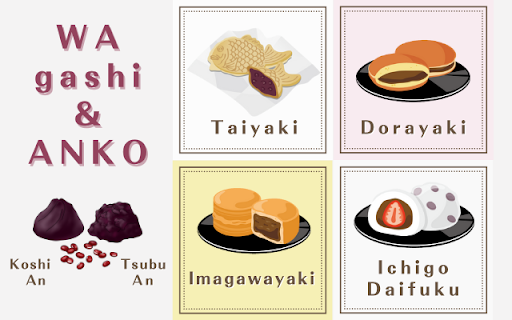
Japanese sweets are a must-try among Japanese foods. In particular, I would like to recommend Japanese sweets using "anko" (red bean paste). Anko is made from sweetened and mashed azuki beans. It is also called "an." It is a popular ingredient in traditional Japanese sweets. Foreigners may feel some resistance to food made from sweetened beans. However, anko and bean foods are not the same thing. Once you try it, you will be surprised at how delicious it is. And you may be addicted to its cute appearance. Today, we will introduce some typical Japanese sweets using anko. こしあん"Koshi-an" and つぶあん"Tsubu-an" are two types of red bean paste There are two main types of red bean paste. One is "koshi-an." Koshi-an is made from cooked azuki beans that have been mashed and then strained. The outer skin of the azuki bean curd is removed so that the texture is very smooth. The other is "tsubu-an." Tsubu-an is made by cooking azuki beans softly, leaving the grains and skin. People either prefer koshi-an or tsubu-an. The colors of red bean paste which are called あかあん "Aka-an" and しろあん "Shiro-an" The color of red bean paste made from azuki beans is described as "aka." Technically, it is not red but rather a brownish-reddish-purple or purplish-reddish-brown color. The general term "aka-an" refers to red bean paste made from red beans such as red kidney beans as well as azuki beans. There is also a type of red bean paste called "shiro-an." "Shiro-an" is made from white beans, such as white kidney beans and white flower beans, cooked sweetly and mashed. Japanese sweets using あんこ "anko" たいやき Taiyaki It is shaped like a fish and filled with tsubuan on the inside. It may seem strange that there is bean paste in a fish, but it is a cute-looking Japanese sweet. There are specialty stores in Asakusa and other sightseeing spots. It is recommended to eat them while walking around. どらやき Dorayaki This Japanese sweet is made with a fluffy pancake-like dough stuffed with tsubu-an. Honey is used in the batter, making it moist and fluffy. Some pancakes contain chestnuts or shiratama (white rice balls like mochi) along with the red bean paste. They are available at convenience stores, supermarkets, and Japanese confectionery stores. いまがわやき Imagawayaki It is a Japanese sweet with a round shape and a filling of tsubuan or shiroan inside. It is sometimes called "oban-yaki" or "kaiten-yaki," depending on the region. In Hyogo Prefecture and the Kansai region, Imagawa-yaki is called "Gozasouro." This is the name of the Imagawa-yaki store that originated in Hyogo. "Gozasoro" is loved by the locals, and is now easily found in the food sections of department stores all over the country. It can be eaten in department stores and tourist areas. だいふく Daifuku It is a Japanese sweet made of mochi dough and wrapped with either koshi-an or tsubu-an. There are many ways to arrange the bean paste and the dough. Mame daifuku is made by boiling large peas or black beans with salt and wrapping them in mochi dough. There are also various types of Daifuku, such as salty salt Daifuku and Kusa Daifuku with yomogi (mugwort). We especially recommend the strawberry daifuku. It contains a single strawberry wrapped in mochi dough and koshian. It can be purchased at convenience stores, supermarkets, department stores, and Japanese confectionery stores. There are many other Japanese sweets using anko. おだんご Odango ようかん Youkan 八つ橋 Yatsuhashi 最中 Monaka あんぱん Anpan あんみつ Anmitsu おしるこ Oshiruko The list is endless when you include famous local confections. That is how inseparable Japanese sweets and anko are. Let's get to know Anko, talk about Japanese sweets, and have fun at Ohanashi Kagawa!
Ohanasi Kagawa
No Category
2023.02.25
Even beginners can use it! What is useful Japanese?
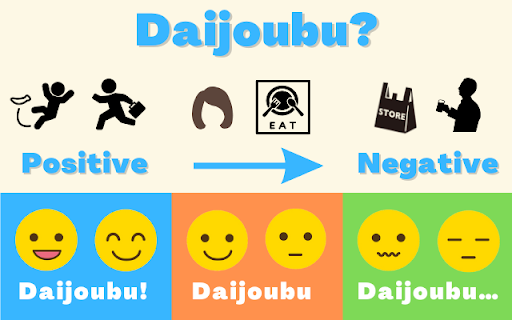
What Japanese do you know? When you are just beginning to learn Japanese, you have to memorize a lot of words. Konnichiwa Itadakimasu Kawaii Arigato These words are also important Japanese words for communication. However, there are more useful words. Words that are one word but can be used in various situations. Here are some words and ways to use them: We recommend these words for beginners who wish to speak Japanese. The word だいじょうぶ "Daijoubu". The word "daijoubu" can be used conveniently with various meanings. In fact, "daijoubu" is a strange word that has both positive and negative meanings. The pronunciation of "daijoubu" is not difficult even for foreigners, so it can be very useful once you learn the situations in which it is used. If you know how to use this word, even beginners in Japanese should be able to speak like native speakers. だいじょうぶ "Daijoubu" with a positive meaning When you fall or get injured 「大丈夫?」 「大丈夫」 「Daijoubu?」 「Daijoubu」 If nothing happened or if the injury was not serious. When you catch a cold and was absent from school. 「たいちょうは大丈夫?」 「大丈夫」 「Are you feeling daijoubu?」 「Daijoubu」 If you are not that sick and recovering. When you are busy at work. 「たいへんそうだけど大丈夫?」 「大丈夫」 「You look busy. Daijoubu?」 「Daijoubu」 If you can manage on your own. When confirming an appointment. 「あしたのよていは大丈夫?」 「大丈夫」 「Are you daijoubu for tomorrow’s appointment?」 「Daijoubu」 If you are going to be on schedule. When you are asked to do something 「これ、きょうじゅうにできる?」 「大丈夫」 「Can you finish this by tomorrow?」 「Daijoubu」 If you know you can do it or are confident about it. Positive "daijoubu" is a common pharse in everyday life. だいじょうぶ "Daijoubu" that has both a positive and negative meaning When asked for opinions on the food. 「Is it good?」 「Daijoubu」 When asked about a new hairstyle or outfit. 「How’s my haircut?」 「Daijoubu」 One must be careful with the answer "Daijoubu" in this situation. It can mean "good" in a positive way, but it can also mean "not good" at the same time. だいじょうぶ "Daijoubu" with a negative meaning. When asked if you want a plastic bag at a convenience store. 「ふくろはいりますか?」 「大丈夫です」 「Do you need a plastic bag?」 「Daijoubu desu」 When you need one. When you want to decline an invitation. 「きょう、のみにいこうか?」 「大丈夫です」 「Do you want to go out for a drink?」 「Daijoubu desu」 When you don’t want to go. Although the correct response would be "irimasen" or "ikimasen," it is commonly used by Japanese who cannot say "no" directly and prefer to decline softly. "Better get used to it than learn it." As the Japanese proverb says, practice makes perfect! Let's talk with people using "daijoubu" at Ohanashi Kagawa!
Ohanasi Kagawa


Popular Articles
- Learn About the Different Types of Sushi and Enjoy Sushi Even More!
Sushi is always one of the top three things foreigners want to eat when the...
- What languages are spoken in Japan? If you want to study Japanese! Types, official language, and second language.
If you are interested in Japan, the first thing you will probably wonder ab...
- Ohanasi Kagawa Event Participation Instructions
In this page, we will tell you how to participate in the Ohanasi Kagawa lan...